
Last updated on
Oct 31, 2026

OPM SF 182 2006 free printable template
pdfFiller is not affiliated with any government organization

Fill out
Complete the form online in a simple drag-and-drop editor.

eSign
Add your legally binding signature or send the form for signing.

Share
Share the form via a link, letting anyone fill it out from any device.

Export
Download, print, email, or move the form to your cloud storage.
Why pdfFiller is the best tool for your documents and forms


End-to-end document management
From editing and signing to collaboration and tracking, pdfFiller has everything you need to get your documents done quickly and efficiently.
Accessible from anywhere
pdfFiller is fully cloud-based. This means you can edit, sign, and share documents from anywhere using your computer, smartphone, or tablet.
Secure and compliant
pdfFiller lets you securely manage documents following global laws like ESIGN, CCPA, and GDPR. It's also HIPAA and SOC 2 compliant.
What is OPM SF 182
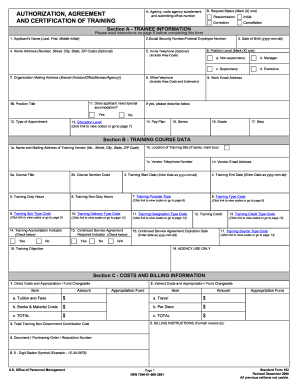
The OPM SF 182 is a government form used by federal employees to request training and development funding.
pdfFiller scores top ratings on review platforms




Who needs OPM SF 182?
Explore how professionals across industries use pdfFiller.

OPM SF 182 is needed by:
-
Federal employees seeking training assistance
-
Supervisors looking to approve employee training requests
-
Human Resources personnel managing training budgets
-
Financial officers overseeing training expenditures
-
Project managers planning employee development initiatives
Comprehensive Guide to OPM SF 182
What is the OPM SF 182?
The OPM SF 182 is a vital form used for federal employee training requests and authorizations. This document facilitates the process whereby federal employees seek approval for training opportunities that enhance their professional skills. Managed primarily by the agency’s training coordinators, the form ensures that training requests are systematically reviewed and authorized.
Understanding the OPM SF 182 is essential for employees aiming to advance their education and training within the government structure. It plays a significant role in the federal employee training request process.
Purpose and Benefits of the OPM SF 182
The purpose of the OPM SF 182 extends beyond mere formality; it serves as a means to empower federal employees in their professional development. By using this form, employees can demonstrate their commitment to continuous learning and improvement.
The benefits of the OPM SF 182 are numerous, including streamlined processing of training requests and a clear pathway for obtaining necessary approvals. Agencies benefit from a more organized approach to employee training that can lead to improved job performance and satisfaction.
Who Needs the OPM SF 182?
The OPM SF 182 is necessary for various job roles within the federal government, particularly for employees looking to partake in training that enhances their capabilities. Eligible positions often include those that require continuous education and skills development.
Specific eligibility criteria dictate who can utilize this form, ensuring that training requests are relevant and beneficial. Common scenarios where the OPM SF 182 applies include requests for workshops, courses, and seminars aimed at professional growth.
How to Fill Out the OPM SF 182 Online
Filling out the OPM SF 182 online requires careful attention. Begin by gathering all essential information, including personal details and training course specifics. Each field on the form must be completed accurately to prevent delays.
-
Access the OPM SF 182 form on the designated platform.
-
Carefully fill in the personal information section.
-
Detail the training being requested, including dates and locations.
-
Review all entering data for accuracy.
-
Submit the form via the chosen submission method.
Common mistakes can often be avoided by double-checking entries before final submission.
Submission Methods and Delivery of the OPM SF 182
Submitting the OPM SF 182 can be done through various methods, ensuring flexibility for employees. Common submission options include online submission, which is often quicker, and traditional mail, suitable for those less comfortable with digital formats.
-
Online submission through the agency's portal.
-
Mailing the completed form to the appropriate training officer.
Included with the form should be any required supporting documents, such as course brochures or approvals. Keep in mind that processing times may vary based on submission method and agency workload.
Common Errors and How to Avoid Them
Many individuals encounter issues while filling out the OPM SF 182, often due to simple errors. Common mistakes include incomplete sections, incorrect signatures, and failure to attach necessary documents.
-
Check for completeness of all required fields.
-
Ensure correct signatures are provided where needed.
-
Attach all required supporting documents before submission.
Reviewing the entire form before submission can significantly reduce the chances of errors and expedite the approval process.
Security and Compliance When Handling the OPM SF 182
Security is paramount when dealing with the OPM SF 182, as it contains sensitive personal and training information. Employing secure methods for completing and submitting this form helps protect against identity theft and data breaches.
pdfFiller offers advanced security measures that comply with federal regulations, ensuring safe handling of forms. Utilizing platforms that emphasize security can mitigate risks associated with submitting sensitive information.
How pdfFiller Simplifies the OPM SF 182 Process
pdfFiller significantly eases the process of completing the OPM SF 182 by providing a user-friendly interface for form completion. Features such as cloud-based accessibility and the capability for electronic signatures streamline the user experience.
-
Real-time editing and document management.
-
E-signature options for faster approvals.
-
Accessibility from any device with internet connectivity.
Users have shared success stories about how pdfFiller has transformed their experience with the OPM SF 182, highlighting the efficiency and convenience of using this platform.
What to Do After Submitting the OPM SF 182
Once the OPM SF 182 is submitted, employees should monitor the status of their training request. Tracking confirmations and knowing follow-up processes can help address any concerns about the request.
-
Check the status of the submitted request through the agency’s portal.
-
Be prepared to make amendments if requested by the training officer.
Understanding possible fees associated with amendments can also help in navigating the post-submission process smoothly.
Sample OPM SF 182 Form for Reference
For guidance, a downloadable sample of a completed OPM SF 182 is available, providing users with a reference point. Reviewing this sample can enhance understanding of how to accurately fill out the form.
-
Download the sample form for a clear visual guide.
-
Learn how to interpret each section effectively.
Using the sample as a reference can streamline the form-filling process for new users.
Join the pdfFiller Community for Seamless PDF Solutions
Engaging with the pdfFiller community offers ongoing support and additional resources for managing PDFs effectively. Users are encouraged to explore further capabilities that pdfFiller provides for secure and efficient document management.
Consider signing up for access to more templates and tools that cater to specific user needs, enhancing your overall experience.
How to fill out the OPM SF 182
-
1.Access the OPM SF 182 form on pdfFiller by entering the site and searching for 'OPM SF 182' in the search bar.
-
2.Once the form appears, click on it to open the document in the editor.
-
3.Before completing the form, ensure you have all necessary details like employee information, training goals, and estimated costs.
-
4.Begin filling in the required fields, focusing on personal details, training title, duration, and purpose of the training.
-
5.Use the pdfFiller interface to easily navigate through the form fields by clicking on each box to enter your information.
-
6.As you fill in information, double-check for accuracy and compliance with training regulations.
-
7.Review the completed form thoroughly to ensure all necessary fields are filled, and there are no errors.
-
8.If your form requires signatures, use the electronic signature feature available in pdfFiller to sign the document digitally.
-
9.Once you are satisfied with your submission, save your work by clicking on the 'Save' option.
-
10.Choose to download the completed form to your device or submit it directly through pdfFiller's submission options.

Who can apply for the OPM SF 182 training funding?
Federal employees who are seeking funding for training and development opportunities are eligible to apply using the OPM SF 182 form.
Are there deadlines for submitting the OPM SF 182 form?
Deadlines may vary depending on specific agency policies. It is essential to check with your supervisor or HR department for any time-sensitive requirements.
How do I submit the OPM SF 182 once completed?
The completed form can be submitted to your immediate supervisor for approval or sent directly to the HR department as per your agency's submission procedures.
What supporting documents are needed with the OPM SF 182 form?
You may need to include a copy of the training program syllabus, cost estimates, and a budget justification to support your funding request.
What common mistakes should I avoid when filling out the OPM SF 182?
Ensure that all fields are completed accurately and review the form for any missing signatures before submission to avoid delays.
How long does it take to process the OPM SF 182 form?
Processing times can vary based on the agency's workflow. Typically, you should allow several weeks for approval after submission.
Is there a fee associated with submitting the OPM SF 182?
There are generally no fees for submitting the OPM SF 182 form itself, but you should check if there are any costs associated with the training program.
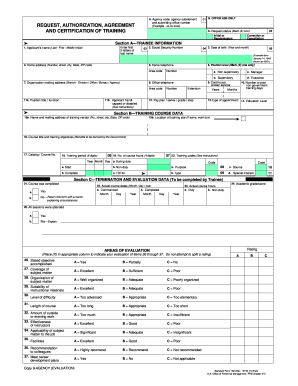
OPM SF 182 Form Versions
Related Content
Related Forms


Related Catalogs
Get the latest insights from our blog



If you believe that this page should be taken down, please follow our DMCA take down process
here
.
This form may include fields for payment information. Data entered in these fields is not covered by PCI DSS compliance.